RouteVN vs Ren'Py
Introduction
The question I hear most often when I tell someone about RouteVN is: "How is it different from Ren'Py?"
This article attempts to give a full answer to that question and explains the trade-offs you should consider when choosing between the two engines.
A visual novel can take months or even years to make, and changing engines midway through production is often impractical. It is sensible to understand the differences to make an informed decision on which engine to choose.
TL;DR
| Ren'Py | RouteVN | |
|---|---|---|
| Inception date | 2004 | 2024 |
| Primary implementation language | Python | JavaScript |
| Open source | Yes | Yes |
| Pricing | Free | Free |
Ren'Py
Ren'Py is an established engine that has been used to create more than 8,000 visual novels, games, and other works. It has been the default choice for visual novel creators. You write a game primarily in the Ren'Py scripting language, which is easier to learn than working directly in Python. Python is available when you need more advanced functionality.
Ren'Py has a large community, extensive documentation, and many tutorials. It is highly customizable and can support simulation systems, minigames, and projects that go well beyond a traditional visual novel. In that sense, it can behave almost like a general-purpose game engine.
RouteVN
RouteVN is a newcomer. Development started in 2024, and its first public release was in December 2025. It is free and open source, built from the ground up on a modern technology stack based on JavaScript.
You never write or touch code. You work in a visual editor with drag-and-drop asset managers, a fully customizable Layout Editor, and a Scene Editor whose live preview updates as you write your story. It provides everything you need to create a visual novel out of the box.
RouteVN wants to make visual novel creation more accessible and a better experience overall. You focus on creativity and story, not on technical details. It is built for writers and artists who have a story to tell but are not comfortable jumping into code, development tools, and technical setup.
User experience and technical requirements
Development environment
Ren'Py development centers on a text editor or an IDE such as VS Code, where you write .rpy files. The engine ships with a lightweight launcher for creating, running, and building projects. When you need advanced behavior, you may have to write Screen Language or Python code. The process then resembles normal software development: you write code, run the project, test it, debug problems, and optimize it when necessary.
RouteVN Creator is a desktop application you download once. Writing, asset management, layout customization, and testing all happen inside the application, with no external tools to install or configure.
Writing experience
In Ren'Py, you write your story in the Ren'Py scripting language. It is readable and becomes natural once you are familiar with its structure, and it is much simpler than implementing the same visual novel directly in Python. A typical script looks like this, from the Ren'Py quickstart:
label start:

    scene bg meadow
    with fade

    "After a short while, we reach the meadows just outside the neighborhood where we both live."

    "It's a scenic view I've grown used to. Autumn is especially beautiful here."

    "When we were children, we played in these meadows a lot, so they're full of memories."

    m "Hey... Umm..."

    show sylvie green smile
    with dissolve

    "She turns to me and smiles. She looks so welcoming that I feel my nervousness melt away."

    "I'll ask her...!"

    m "Ummm... Will you..."

    m "Will you be my artist for a visual novel?"
To preview your changes, you run the project from the launcher.
In RouteVN Creator, projects are organized into scenes and sections on a story map. Dialogue, choices, and other story actions are edited as lines in the Scene Editor, whose live preview is RouteVN's signature experience: dialogue, characters, backgrounds, sound, and presentation changes appear immediately as you move through the story.
Customizing layout
Ren'Py's interface can be customized extensively, but that requires learning its Screen Language, styles, and configuration system, one of the steeper parts of the learning curve for a non-technical creator.
screen preferences():

    tag menu

    # Include the navigation.
    use navigation

    # Put the navigation columns in a three-wide grid.
    grid 3 1:
        style_prefix "prefs"
        xfill True

        # The left column.
        vbox:
            frame:
                style_prefix "pref"
                has vbox

                label _("Display")
                textbutton _("Window") action Preference("display", "window")
                textbutton _("Fullscreen") action Preference("display", "fullscreen")

            frame:
                style_prefix "pref"
                has vbox

                label _("Transitions")
                textbutton _("All") action Preference("transitions", "all")
                textbutton _("None") action Preference("transitions", "none")

            ...

        vbox:

            frame:
                style_prefix "pref"
                has vbox

                label _("Skip")
                textbutton _("Seen Messages") action Preference("skip", "seen")
                textbutton _("All Messages") action Preference("skip", "all")

            ...

        vbox:

            frame:
                style_prefix "pref"
                has vbox

                label _("Music Volume")
                bar value Preference("music volume")

            ...

style pref_frame:
    xfill True
    xmargin 5
    top_margin 5

style pref_vbox:
    xfill True

style pref_button:
    size_group "pref"
    xalign 1.0

...
In RouteVN Creator, layouts are customized visually in the Layout Editor, an experience similar to using a design tool.
Asset and resource management
Ren'Py manages assets and project structure through the OS's files and folders. For example, images go under the game/images folder, and the filename becomes the identifier.
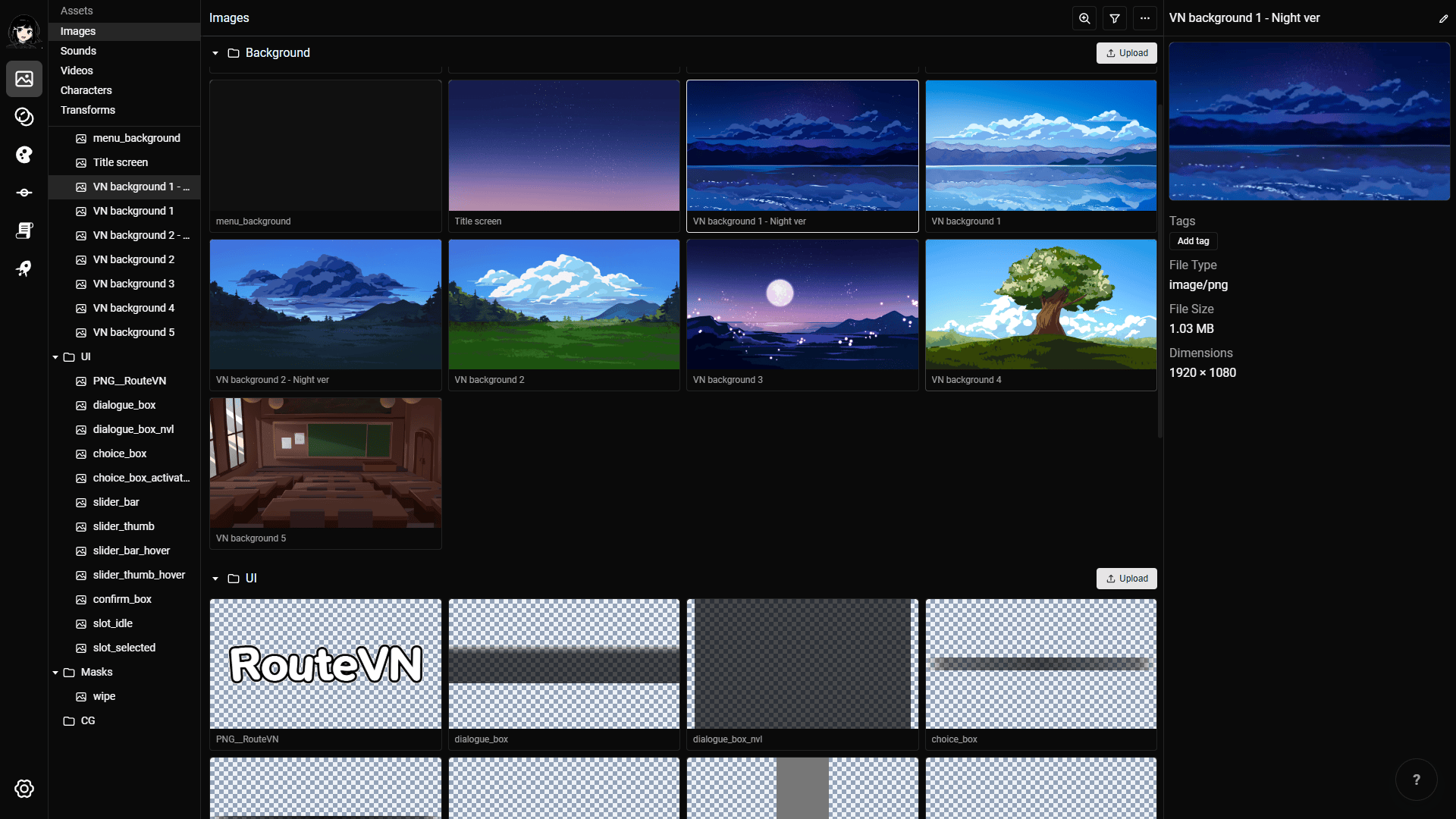
In RouteVN Creator, images, audio, videos, characters, and fonts each have a dedicated manager where you drag and drop files to import them. Once imported, viewing and re-ordering the assets is done inside the app, without dependency to the file system.
Maturity & community
Ren'Py has been developed for more than 20 years. RouteVN development began just over two years ago, and its public release is less than a year old. The two products are therefore at completely different levels of maturity.
Ren'Py has a large user base, thousands of completed projects, and a substantial collection of documentation, forum discussions, examples, and video tutorials. If you encounter a common problem, there is a good chance that someone has already discussed or solved it.
RouteVN is much smaller but growing quickly. Its community is still small, but it is active and helpful. The smaller scale comes with an advantage: you get support directly from the RouteVN team. The team is present on the official Discord server, and the author is very responsive, so your questions and problem reports often reach the people actually building the app.
Only a small number of RouteVN visual novels have been publicly released so far, while more than a dozen projects are currently in development.
Documentation and tutorials
Ren'Py's documentation is extensive. It covers the scripting language, the Screen Language, and Python integration in depth, and it tends to be technical.
There are also many community Ren'Py tutorials out there. Those can be found across YouTube, blogs, and forums. There is no single place to look, quality varies, and some tutorials are out of date and no longer match the current version of Ren'Py.
RouteVN provides official documentation, with official video tutorials coming soon. Both are produced by the RouteVN team, the same people who build the app. Learning material and application stay in sync, so the tutorials are more consistent in quality and accuracy.
Active development
Both projects remain actively developed, but with different release strategies. Ren'Py supports a broad, mature feature set and must test releases carefully against a large user base, so it publishes larger, less frequent updates. In 2026, it published four releases.
RouteVN moves in smaller, faster steps. Expect roughly weekly releases of the Creator client, with the underlying Route Engine released even more often. Release counts are not directly comparable between projects, but being a younger project, a higher pace of updates can be expected from RouteVN.
Customization
For full customization, Ren'Py is the better choice: its scripting language, Screen Language, and Python support provide extensibility with almost no limit, letting developers build custom interfaces, simulation systems, minigames, and mechanics that are uncommon in visual novels.
RouteVN is very highly customizable within the scope of visual novels. Its visual tools cover a broad range of features out of the box: dialogue, choices, branching scenes, variables, conditional logic, user input, customizable layouts, clickable hotspots, and inventory-like state.
The limit is the feature set itself: if the interface does not support a particular mechanic, you cannot add arbitrary code through the standard no-code workflow.
If your project depends on unusual mechanics or complete control over implementation, Ren'Py is the stronger choice. If it fits the features RouteVN exposes, RouteVN removes a substantial amount of technical work.
Platform support and export options
Both RouteVN Creator and the Ren'Py SDK run on Windows, macOS, and Linux, but their export options differ.
| Export target | Ren'Py | RouteVN |
|---|---|---|
| Web | Yes | Yes |
| Windows | Yes | Yes |
| macOS | Yes | Yes |
| Linux | Yes | Coming soon |
| Android | Yes | Coming soon |
| iOS | Work in progress | Coming soon |
Ren'Py also builds for all major desktop and mobile platforms. Its web export is officially in beta, and iOS support is described by the Ren'Py team as a work in progress: it requires a Mac with Xcode, and the default interface does not comply with Apple's App Store guidelines, so expect extra work to ship on iOS.
RouteVN exports as a web build you can publish on platforms such as itch.io, plus desktop exports for Windows and macOS. Linux, Android, and iOS are coming soon.
Conclusion
Both Ren'Py and RouteVN are specialized tools for creating visual novels.
Ren'Py remains the mature, proven default, with a big community. Choose Ren'Py if you value proven tools, need very high customizability, and do not mind the learning curve of coding and scripting.
RouteVN is the new contender, striving to greatly simplify and improve the experience of making visual novels. It is very actively developed and improving quickly. Choose RouteVN if you want a friendlier user experience, an easier start without coding, and do not mind a small but growing community.
Ultimately, the best way to decide is to try both engines yourself and see which feels most natural to you.